Stop List Card Options enable a user to customize Stop cards on the Stop List page.
It is actually possible to set the unified card style for all the cards on the Stop List (by using correspondent setting on the Experience Edit page). But if a Stop page tile requires a unique design then it is possible to set it on each Stop page separately by applying necessary styles in the Stop List Card Options section.
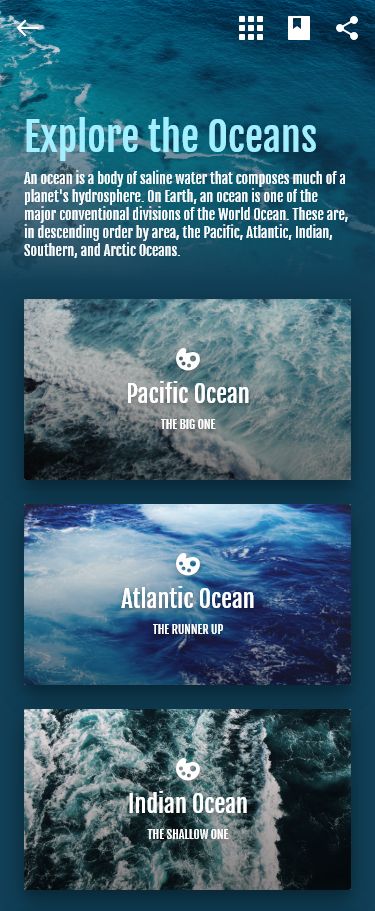
The following settings can be applied for customizing a Stop List Card:
-
Card Cover
-
Color applies as the Stop List card background color.
-
Gradient applies as the Stop List card background gradient.
-
Image applies as the Stop List card background image and partially lays on the background color and gradient.
-
To add an image as the Card Cover Image
-
Click + button on the card to see to image uploading options.
-
Upload from Computer
-
Select from gallery
-
-
Choose an option and add the Card Cover image.
-
Click Submit button in the upper right corner of the page to save the changes
-
-
-

-
Card Content
-
Title styles the Stop page title on the Stop List card.
-
Subtitle is used for customizing the Stop page subtitle on the Stop List card.
-
-
Card Wayfinding settings are used to style the Wayfinding on the Stop List card.
-
Duplicate from Stop Options control if on, copy the Wayfinding settings values set in the Stop Content section on the Stop Page.
-
NOTE: the control is functioning only if a similar control is on the Experience Edit page (Wayfinding card).
-
-
Icon the chosen icon displays on the Stop list.
-
Icon color sets the color of the chosen icon.
-
Stop code cog styles the stop code on the Stop card.
-
Location info cog is used to style the Location info field value displayed on the Stop List page.
-